27 October, 2025 - Last week in TI
- Rahul Subramaniam
- Releases
- October 27, 2025
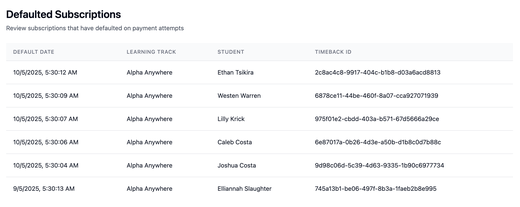
EduPaid v2.8.1: Defaulted Subscriptions Tracking & Mobile Optimization
Streamlined provider operations with defaulted payment tracking and mobile-friendly subscription history for improved accessibility and efficient account management.
- Defaulted subscriptions tracking: Alerts page displays subscriptions with defaulted payments, showing detailed information including student name, learning track, and default date to help providers quickly identify accounts needing attention and efficient follow-up.
- Mobile-friendly subscription history: Mobile users access filters through convenient toggle button, card-based layout makes transaction history easier to read on smaller screens, and parents can download invoices and payment receipts directly with a simple tap.
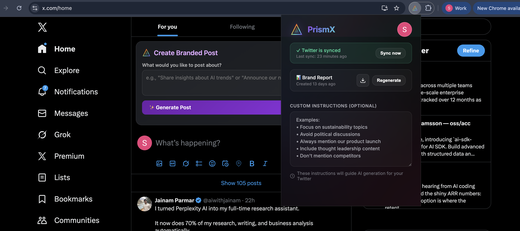
PrismX: Your Tweet Creation Experience, Perfected! ✨
We’ve eliminated friction points and fine-tuned every detail of your PrismX experience, making branded content creation faster, cleaner, and more reliable than ever.
- 🎯 Perfect Positioning: Post panel appears exactly where you need it—top of your X feed, ready when inspiration strikes
- 🔄 Memory That Sticks: Set your tweet preferences once, PrismX remembers forever—no more re-entering instructions
- 🚫 Zero Clutter: Eliminated duplicate buttons and panels—clean, focused interface every time
- ✨ Polished Experience: Refined layout with smoother interactions and intuitive navigation throughout
- 🔐 Never Miss a Beat: Auto-switches to PrismX mode when sessions expire—uninterrupted workflow guaranteed
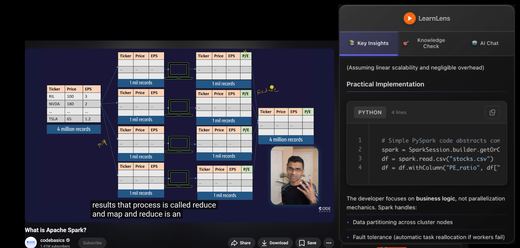
LearnLens: Your Learning Companion Just Got Smarter & Faster! 🎓
We’ve supercharged LearnLens to make learning from videos more efficient, intuitive, and enjoyable with major improvements to chat intelligence, code readability, and overall reliability.
- 🚀 Lightning Chat: Get laser-focused answers that cut straight to the point—no irrelevant fluff, just pure learning gold
- 💻 New Code Blocks: Added professional syntax highlighting + line numbers + one-click copy—coding tutorials just got beautiful
- 🎯 Smart Timeline Markers: Perfectly distributed learning checkpoints that adapt to any video length—10 minutes or 3 hours
- 🔄 Zero-Maintenance Mode: Auto-retry handles hiccups, enhanced error handling—just focus on learning, we handle the rest
- 📊 Crystal-Clear Visuals: Reliable diagram rendering makes complex concepts click instantly—technical visualizations that actually work
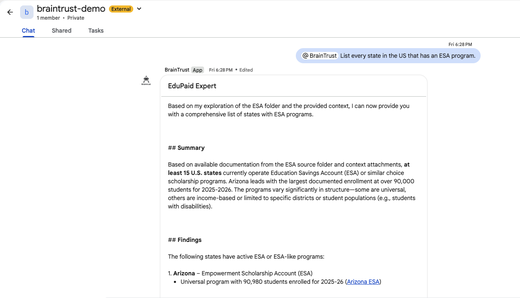
BraintTrust: Enhanced Collaboration with Google Chat Integration
Bring your AI agents into team conversations and empower them with organizational knowledge through seamless Google Chat and Drive integration.
- Group Spaces Support – Add BraintTrust agents directly to Google Chat group spaces via the BraintTrust GChat app, enabling your AI assistants to participate in team discussions and collaborate alongside human team members in shared workspaces.
- Drive Integration for Agents – Attach Google Drive folders and files to your agents to enhance their knowledge base, allowing them to reference your organization’s documents, policies, and resources when providing intelligent responses and recommendations.