
04 March, 2026 - Last week in TI
- Rahul Subramaniam
- Releases
- March 4, 2026
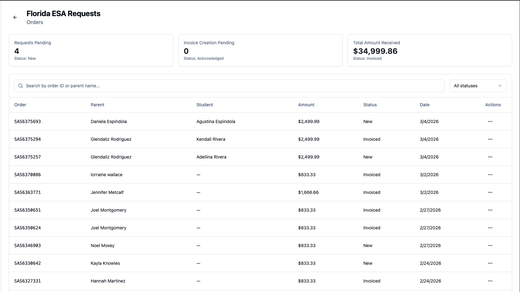
EduPaid v2.20.0: Florida ESA Orders, Credit Deposits & Enhanced Parent Experience
Admins and providers can manage Florida ESA orders from Ariba with accept/reject/invoice/refund actions, track credit deposits with reversal capability, while parents receive ESA funds notifications and improved onboarding.
- Florida ESA orders from Ariba: Admins sync orders from SAP Business Network into Florida Orders page showing document number, student, parent, amount, and status—both portals can accept/reject new orders, create invoices for confirmed orders, process refunds with per-line amounts, and view full order details before action.
- Credit deposits with reversal tracking: New Credit Deposits page shows student, learning track, amount, date, added-by user, and note with filter by learning track/user and search by student—both admins and providers can reverse deposits with required reason for audit trail, displaying Success/Reversed/Reversal status badges.
- ESA funds received email notification: Parents receive automatic email when ESA funds are added to wallet showing amount, student, and learning track with clear deposit details for fund usage.
- Refined first-time user onboarding: Updated onboarding flow with cleaner step indicator and banner styling, improved subscription portal and billing steps for easier navigation by new parents.
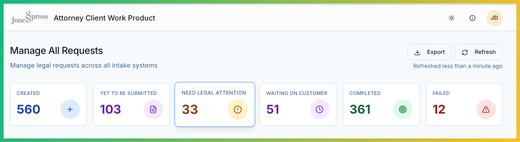
Legal Intake: Advanced AI Models, Smarter Summaries & Streamlined Admin Configuration
Legal Intake v2.2.4 Alpha brings reasoning model support for deeper legal analysis, knowledgebase-powered summaries, and improved intake system configuration.
- Thinking and reasoning models – Support for advanced reasoning models from Anthropic (Claude Sonnet 4.5/4.6 Thinking, Claude Opus 4.6), OpenAI (GPT-5, GPT-5 Mini), and Grok (Grok 4.1 Fast)—enabling deeper multi-step legal analysis during interactive review with no configuration changes required.
- Knowledge-powered summary generation – AI now references knowledgebase documents during summary generation, producing richer and more context-aware summaries while selectively loading only relevant documents to improve response quality.
- Default assignee and assignment guide – Legal admins can set a default assignee per intake system and provide assignment guidance text, improving routing accuracy and helping end users select the right legal team member.
-
Markdown file upload for instructions – Legal admins can upload
.mdfiles for interactive review instructions instead of manually pasting them, with markdown preview. - Claude Plugin for instruction authoring – Published a plugin that helps legal admins write intake system instructions compliant with the Legal Intake platform architecture, improving question quality, summary accuracy, and reducing errors.
- Faster AI responses – Introduced prompt caching and optimized model selection for faster response times and lower costs during interactive review sessions.
- Adoption – 550+ requests submitted, 140+ users with 40-60 daily active users, 12 intake systems onboarded handling vendor and customer matters.
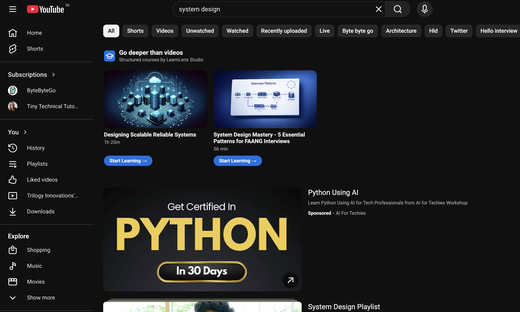
LearnLens: YouTube Course Discovery, Smarter Completion & API Docs
LearnLens now recommends courses directly inside YouTube, shows context-aware completion overlays when a course ends, fixes caption and control overlap during playback, ships fully responsive layouts across all devices, and opens the API docs publicly so developers can build integrations without signing up.
- Courses surface on YouTube search – A course carousel appears alongside YouTube search results, matched by AI semantic search on full video summaries—so recommendations are based on meaning, not just keywords.
- Courses tab on video pages – While watching any YouTube video, a dedicated Courses tab appears with courses relevant to what’s playing, surfacing learning opportunities in context.
- Proactive gap detection – LearnLens tracks your watch history over time, identifies knowledge gaps, and proactively recommends courses to fill them.
- Context-aware course completion overlay – When the final segment ends, LearnLens shows the right screen based on actual progress: Course Completed (everything done), Session Ended (final segment finished but earlier segments remain), or Already Completed (re-watching a finished course with skipped segments elsewhere).
- Captions and controls no longer overlap – The progress bar no longer covers captions during playback and player controls stay out of the way while you’re reading.
- Fully responsive across devices – All pages and components are optimized for mobile; the layout adapts cleanly from phone to wide monitor.
- API docs – Swagger UI is live at studio.learnerslens.ai/api-docs. Authenticate via Google OAuth directly on the page and your token is auto-injected so you can test any endpoint immediately. The search endpoint is purpose-built for building course-recommendation integrations inside your own product.
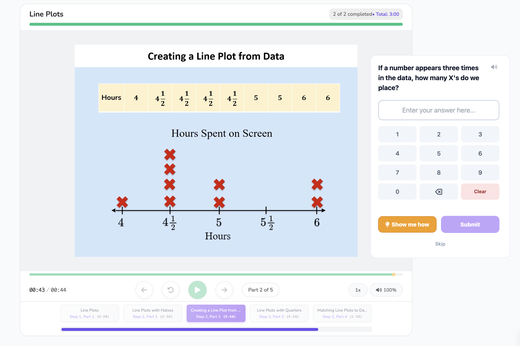
Athena Applets: Strong Quality Metrics & Multi-Grade Expansion
14 new lessons generated, 7 lessons approved this week with a 71.4% pass rate. Total review time was 89.1 minutes (5.9 minutes per iteration), and the current review queue holds 115 lessons.
- Production output – 14 new lessons generated and 7 lessons approved this week.
- Quality improvement – 71.4% pass rate.
- Efficient iteration cycle – 15 total iterations completed in the past 7 days (8 feedback rounds, 7 approvals) with an average of 4.8 comments per lesson (38 total comments).
- Multi-grade coverage – Lessons approved in Grade 3 (2 lessons) and Grade 3 Supporting (5 lessons), with a review queue of 115 lessons ready for validation (Grade 3: 35, Grade 3 Supporting: 9, Grade 4: 3, Grade 4 TEKS: 2, Grade 6: 59, Grade 6 TEKS: 2, Grade 7: 4).
- Review time insights – Average review time of 5.9 minutes per iteration (total 89.1 minutes).
- Complete lesson catalog – See the full list of all uploaded lessons across grades in this lesson catalog with direct links to each lesson.
BrainTrust: Finance Agent Enhancements & Platform Improvements
BrainTrust enhances its Finance Agent with improved account categorization logic and Jira integration, while strengthening platform security and developer experience through dependency updates and development environment improvements.
- Enhanced Finance Agent with Improved Categorization – We’ve been working closely with the finance team to iterate on the Finance Agent, delivering significant improvements to account categorization and classification logic. All enhancements are bundled as data files and Python scripts within the skill itself, making the agent smarter and more accurate when analyzing financial data.
- Automatic Jira Integration for Mismatched Accounts – When the Finance Agent identifies a mismatched account, it now automatically creates a Jira ticket with full context and links to detailed reports. This streamlines the reconciliation workflow and ensures no issues slip through the cracks, giving finance teams immediate visibility and action items.
- Human Verification Table for Zoning Results – A new human verification table empowers users to verify and override zoning results with confidence. Fully integrated with the feasibility API used in real estate analysis and the zoning UI, this feature increases trust in the internal zoning tool by putting human oversight at the center of the workflow.
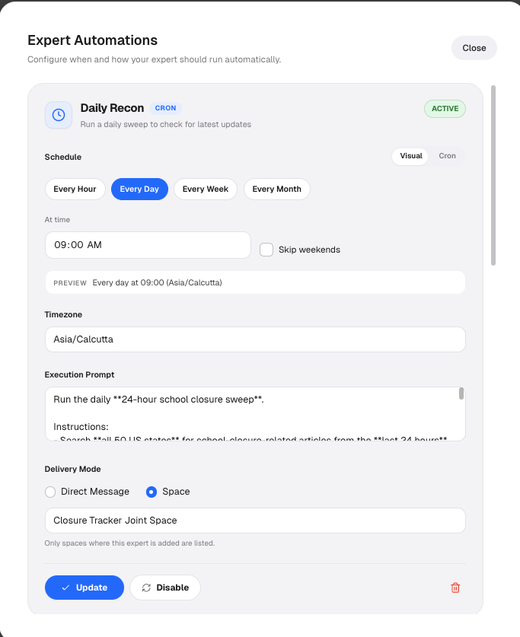
- Enhanced Cron UX with Visual Editor – Cron scheduling just got easier! Users can now visually set simple cron schedules through an intuitive interface, while still having full support for complex cron expressions via standard cron syntax for advanced use cases. This makes scheduling tasks more accessible for all users while maintaining power-user flexibility.
Athena Accelerator - QTI Assessment Item Authoring Engine
This release closes the end-to-end loop: assessment items authored with the SDK can now be packaged, standards-aligned, and uploaded directly to TimeBack — all from a single CLI command or Python call. The feedback system has been redesigned to actually work in QTI players, SVG diagrams are now first-class content, and the SDK ships as a pip-installable Python package.
- End-to-End Upload to TimeBack – The SDK now packages built QTI 3.0 items into a compliant ZIP, resolves curriculum standards against the CASE registry, downloads and bundles PCI JavaScript modules for offline delivery, and uploads the package to TimeBack in a single pipeline call. Job status polling is built in.
-
Command-Line Interface – A new
qti-sdkCLI lets teams go from JSON item definitions to uploaded assessments without writing Python. Key commands:build(JSON → QTI XML files),upload(JSON → build → package → upload → poll),status(check ingest job progress) -
Inline SVG Support – SVG diagrams embedded in questions, choices, stimuli, or feedback are automatically extracted to standalone
.svgfiles and replaced with spec-compliant<img>references. Sizing is preserved, filenames are deterministic, and generated assets are bundled into the upload package automatically. -
Curriculum Discovery & Type-Safe Keys – A
CurriculumKeyenum provides IDE autocomplete and typo protection when specifying curriculum standards. Upload validation now rejects items with missing or invalid curriculum keys before any network calls. -
Live QTI Player UI – Every item uploaded to TimeBack is immediately viewable in a deployed QTI player. The URL can be generated programmatically, so anyone can fetch and render the exact questions for their job — e.g.
player.incept-qti.ti.trilogy.com/content-browser?contentType=QUESTION&m.generator=incept-generator&m.subject=math&m.grade=3&m.batch=sdk-045-2each. - Known Issues – Minor Math rendering (LaTeX/MathML) and template-driven items still have player-specific display issues.
Marauders Map: Per-Student Presence Heatmap & Real-Time Object Detection
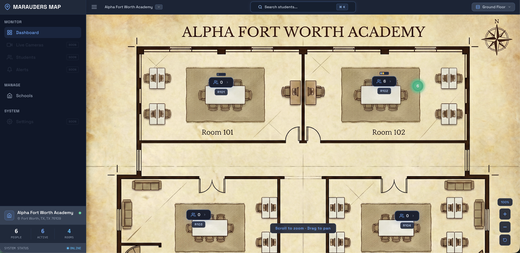
Marauders Map introduces a multi-scale presence heatmap that reveals where each student spends their time across rooms and the entire school floor, plus real-time furniture and object detection that automatically maps the physical layout of every classroom.
- Per-Student Presence Heatmap - Select any identified student to see a spatial heatmap overlaid on the classroom floorplan, color-coded from cool blue (low presence) through yellow to hot red (high presence) with Gaussian blur smoothing. At the school-floor view, room polygons are dynamically shaded by cumulative time spent with per-room fraction badges, so administrators can see at a glance which rooms a student frequents most. Choose between 1-hour, 1-day, and 1-week time windows to analyze short-term activity or long-term habits, with all windows prefetched for instant switching.
- Real-Time Object Detection - A fine-tuned YOLO26x model detects six furniture classes, sofa, chair, table, bookshelf, door, and potted plant in every camera feed, with IoU-based deduplication and segment-based caching to eliminate flicker. Detected objects appear as color-coded bounding boxes on the video overlay and as labeled dots on the 2D floorplan, giving a live inventory of every room’s physical layout alongside person tracking.
EduLLM Social Studies: Multi-Grade Question Generation
EduLLM Social Studies now supports automated question generation for Grades 5 and 7, covering MCQ, MSQ, and FILL-IN problem types across all substandards.
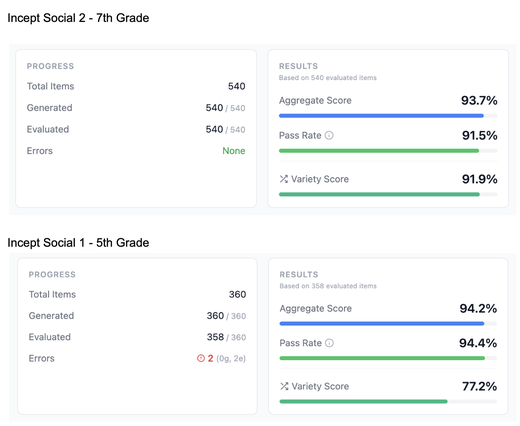
- Grade 7 (Medieval & Early Modern World History): 540 items generated and evaluated with 93.7% aggregate score, 91.5% pass rate, and 91.9% variety score.
- Grade 5 (US History to 1820): 360 items generated, 358 evaluated with 94.2% aggregate score, 94.4% pass rate, and 77.2% variety score.