
25 February, 2026 - Last week in TI
- Rahul Subramaniam
- Releases
- February 25, 2026
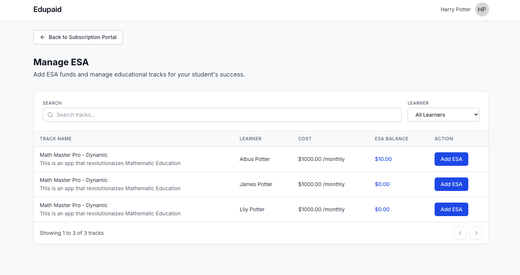
EduPaid v2.19.0: ESA Management, Payment Reminders & ClassWallet Automation
Parents gain dedicated ESA fund management pages with checkout, receive advance payment reminder emails, while admins get ClassWallet automation tools for finance reconciliation and providers can export students with state filtering.
- Parent ESA management: New Manage ESA page displays all ESA-eligible tracks across children with search/filter, links to ESA Checkout for adding funds with amount verification and invoice download.
- Upcoming payments reminder email: Parents receive advance notice before scheduled charges with breakdown by student/track and clearer layout grouping fund application order at bottom.
- ClassWallet automation: Admins can fetch ClassWallet orders showing student, track, and invoice amounts for Finance reconciliation, process orders with real-time progress, and view run history.
- Provider exports and filtering: Export students to Excel with progress tracking and filter students list by state for regional management.
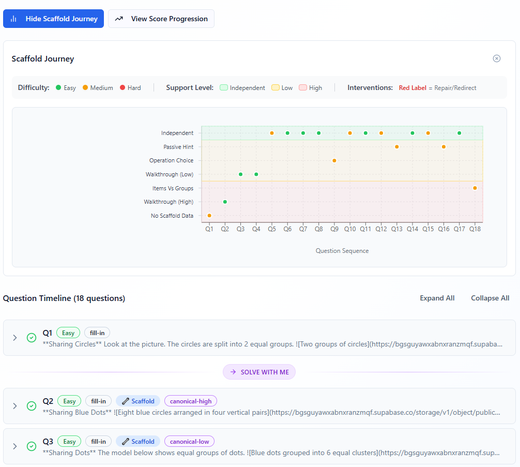
Athena Accelerator - QTI Assessment Item Authoring Engine
This release delivers a purpose-built SDK for generating standards-compliant QTI 3.0 assessment items, abstracting away QTI XML complexity so teams can programmatically create rich, interactive assessment content across six question types and six assessment behaviors.
- Six Question Types – The SDK supports Choice (single and multi-select MCQs), Text Entry (fill-in-the-blank), Extended Text (free-response/essay), Match (matching and categorization), Order (sequencing and ranking), and Portable Custom Interactions (PCI, for bespoke interactive widgets). Each type includes built-in scoring — from simple right/wrong to weighted partial credit.
- Six Assessment Behaviors – Every question can be configured as Summative, Formative with Feedback, Adaptive Scaffolded (progressive hints and worked solutions across attempts), Adaptive with Remediation (video or text remediation on incorrect responses), External Graded (human or machine scoring post-submission), or Diagnostic (misconception-targeted per-choice feedback).
- Rich Content & Stimulus Support – Questions support Markdown, LaTeX math, and multimedia stimulus materials (text passages, images, audio, video). Composite items combining multiple question types in a single item and template-driven randomized variants are also supported.
- Known Issues – There are rendering issues with math notation (LaTeX/MathML), stimulus display, and template-driven items in certain player configurations. Ordering and PCI interaction types are pending player validation.
- Next Steps – Resolve known rendering and validation issues, add support for additional question types beyond the current six, and build a utility to package and upload items to Timeback for delivery platform consumption.
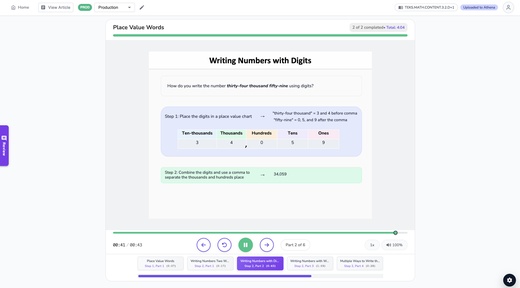
Athena Applets: Strong Quality Metrics & Multi-Grade Expansion
5 new lessons generated, 5 lessons approved this week. Total review time was 122.2 minutes (11.1 minutes per iteration), and the current review queue holds 112 lessons.
- Production output – 5 new lessons generated (Grade 3 Supporting Lessons) and 5 lessons approved this week.
- Efficient iteration cycle – 11 total iterations completed in the past 7 days (5 feedback rounds, 6 approvals) with an average of 7.6 comments per lesson (38 total comments).
- Multi-grade coverage – Lessons approved in Grade 3 (5 lessons), with a review queue of 112 lessons ready for validation (Grade 3: 41, Grade 4: 3, Grade 5: 0, Grade 6: 59, Grade 7: 4, Grade 3 Supporting: 5).
- Review time insights – Average review time of 11.1 minutes per iteration (total 122.2 minutes).
- Complete lesson catalog – See the full list of all uploaded lessons across grades in this lesson catalog with direct links to each lesson.
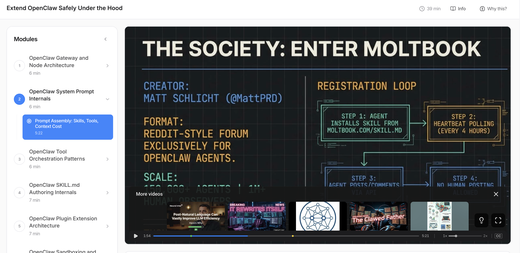
LearnLens Studio: Smarter Video Selection, Persistent Progress & Custom Player
This week is about quality and permanence—your progress now sticks across sessions, a custom video player keeps you focused, and every video in your course earns its spot through depth scoring and expert-first search.
- Progress that stays with you – Unlocked notes are now saved even when you skip to quiz, jump between segments, or come back days later.
- Custom video player built for learning – Replaced YouTube’s native controls with a focused player: play/pause, speed slider (0.75x–2x), drag-to-scrub progress bar with live timestamp tooltip, and closed captions. The progress bar shows only the current segment’s time range with markers indicating where retrieval prompts appear—so you always know what’s coming and exactly where you are.
- Only high-density videos make the cut – Every video gets a depth score measuring actual knowledge per minute. Padded content where 15 minutes of real information is stretched into 60 gets filtered out before you see it.
- Expert educators over influencer content – Search now steers toward expert educators and away from follow-along or live-coding content, with raised quality thresholds across all levels.
- Difficulty level shapes your entire course – Your difficulty setting now drives concept framing, video selection, question depth, and pre-test starting level—not just a label. A new difficulty picker in course settings makes it easy to adjust.
- Course thumbnails from real content – Thumbnails now use actual YouTube frames from selected segments, producing accurate visuals instead of generic AI illustrations.
BrainTrust: Balance Sheet Agent, Skills Adoption & School Closure Tracker Enhancements
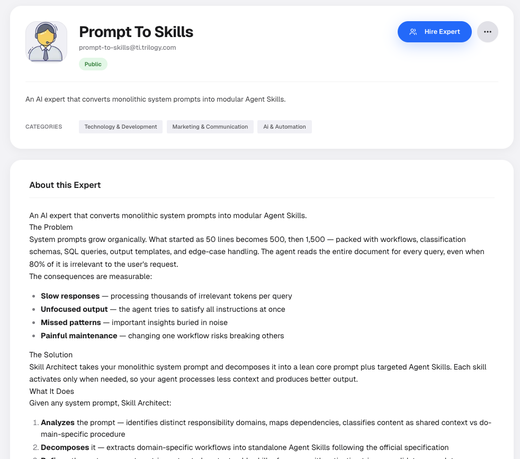
BrainTrust launches a specialized Balance Sheet Agent with live NetSuite integration, introduces a dedicated expert to help teams convert system prompts to reusable skills, delivers key platform improvements including direct file processing, and enhances School Closure Tracker with new data sources and AI-powered cleanup.
- Balance Sheet Agent with Live NetSuite Integration – This financial intelligence agent connects to NetSuite to pull trial balance data by subsidiary and period. It classifies accounts into Assets, Liabilities, or Equity, flags unusual balances (like negative cash or positive accounts payable), and ranks issues by severity. You can drill into flagged accounts for transaction-level detail and actionable recommendations before reconciliation issues escalate.
- Direct File Processing in Chat – Files shared in chat now go straight to your agent for immediate analysis. Instead of only indexing uploads in the knowledge base, agents can now process documents, spreadsheets, images, and more in real time. This delivers faster answers, better accuracy, and context-specific analysis without indexing delays.
- Skills Adoption & Converter Expert – We launched a dedicated System Prompt to Skills Converter Expert that automatically converts existing system prompts into properly formatted skill files. It includes built-in Google Drive and GitHub integrations for easy import and export. We also ran hands-on client demos to convert long prompts into reusable skills, improving agent consistency and maintainability.
- School Closure Tracker Enhancements – We expanded coverage with Yutori Scout integration to monitor discussion boards, local newspapers, and community announcements for closures that web scraping often misses. We also added LLM-based cleanup for historical backfills and deduplication, plus coordinate-based deduping and automated address enrichment for more complete real estate intelligence.
Marauders Map: Student Search, Smart Clustering & School Management Onboarding
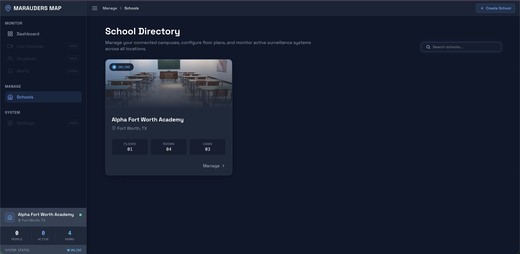
Marauders Map introduces a Cmd+K student search with live location awareness, zoom-adaptive people clustering on the floorplan map, and a full school management suite covering floors, rooms, cameras, calibration, and activation—completing the end-to-end school onboarding pipeline.
- Cmd+K Student Search with Live Location - Global search overlay triggered by ⌘K or ambient typing lets admins instantly find any student by name, showing real-time online/offline status and current room location via SSE streaming—selecting an online student navigates the map to their room and highlights their position with keyboard-first navigation (Arrow keys + Enter) and sorted results that surface active students first.
- Zoom-Adaptive People Clustering on Map - Nearby people within each room are automatically grouped into animated green gradient cluster bubbles at low zoom, splitting into individual person dots as you zoom past 1.35x—a greedy radius-based algorithm maps room-local camera coordinates to school-wide floorplan space using polygon bounding boxes, with cluster centers clamped to room boundaries, pulsing ring animations, and cyan/blue highlighting when a student is selected via search.
- School Management & Onboarding Screens - Complete admin interface to create schools, sync cameras from Rhombus with one click, upload floorplans (served via CloudFront CDN), draw room boundary polygons with undo/redo on an interactive canvas, assign cameras to floors and rooms via inline dropdowns, and calibrate each camera using a split-screen point-pair homography tool—with a final activation endpoint that validates completeness before enabling live monitoring.
- Floor & Room Configuration with Polygon Drawing - Tabbed school detail view with floor selector pills, drag-and-drop floorplan uploads, a room table with inline editing and type classification, and a click-to-draw polygon tool that auto-closes boundaries and supports undo/redo—plus a dedicated tracking boundary editor for fine-tuning position mapping per room.
EduLLM Math: Support for Math Grade 1
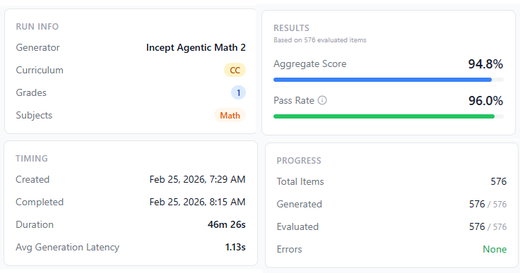
EduLLM Math now supports Math Grade 1.
- Math Grade 1: Support for Math Grade 1 standards has been added, enabling generation of questions for this grade level. Currently scoring 96% on the benchmark.