
18 February, 2026 - Last week in TI
- Rahul Subramaniam
- Releases
- February 18, 2026
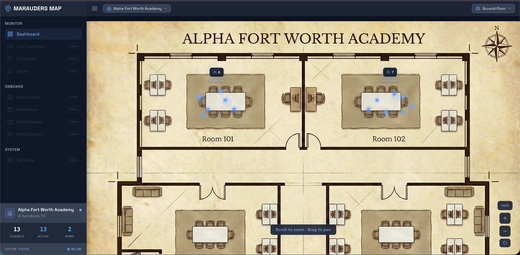
Marauders Map: Interactive Dashboard, Admin Sidebar, Student Info Panel & Video on Demand
Marauders Map ships a complete dashboard overhaul with a continuous-zoom floorplan map, an admin sidebar with live school statistics, a student info panel with presence history and conversation logs, and on-demand video playback from Rhombus cameras—transforming raw CV data into an actionable school monitoring interface.
- Interactive Dashboard with Continuous Map Navigation - New orchestrator dashboard features a scroll-to-zoom, drag-to-pan floorplan map with room hotspots showing live occupancy counts and animated people dots, a frosted-glass breadcrumb header, and school/floor selector dropdowns—click any room badge to dive into the real-time room detail view with live tracking and video.
- Admin Sidebar with Live Statistics - Collapsible left navigation panel displays real-time school metrics (Total Students, Active Count, Room Count) with a system status indicator, organized into Monitor, Onboard, and System sections with ‘Coming Soon’ badges for future capabilities.
- Student Info Panel with Presence Timeline & Conversation Logs - Slide-out detail panel shows identified students with role-based styling (student/staff/visitor/unknown), a vertical presence timeline of room visits with entry/exit times and durations, and a conversation log displaying interaction partners, confidence scores, and locations.
- Video on Demand with DASH & WebSocket Streaming - Integrated video player supports both DASH adaptive streaming for live Rhombus camera feeds and base64 JPEG frame streaming via WebSocket, with annotated bounding boxes, a fullscreen overlay mode, camera switching, and graceful offline/error states.
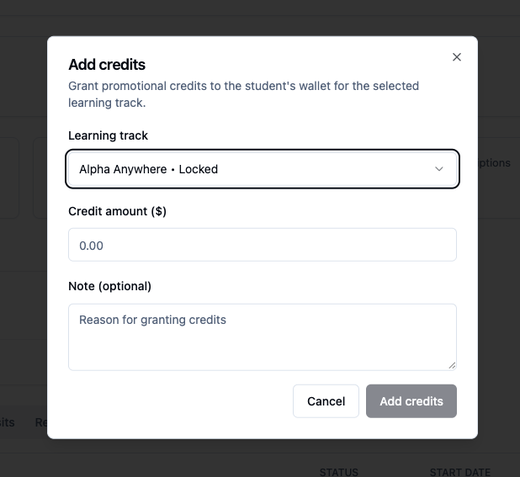
EduPaid v2.18.1: Provider Credits, Financial Insights & Enhanced Email Notifications
Providers can now grant promotional credits directly to student wallets, view enhanced financial insights with trend indicators and ESA upcoming metrics, while admins gain inline parent info editing and parents receive improved payment failure emails with direct login access.
- Provider wallet credits and enhanced financial overview: Providers can grant promotional credits directly to student wallets from the student details page with learning track selection, amount validation, and optional notes, while Financial Overview now shows trend indicators (percentage change for Total Billed, Discounts, Defaulters) with up/down arrows, Total ESA Upcoming metric for expected ESA funds, and ‘This Month’ date preset for faster filtering.
- Admin ESA log editing and improved parent notifications: Admins can correct parent name and email directly from ESA Logs tab for failed records with immediate retry capability without leaving the portal, while payment failure emails now include a direct login button with context-aware labels (‘Update Payment Information’ or ‘Reactivate Your Subscription’) for one-click account access.
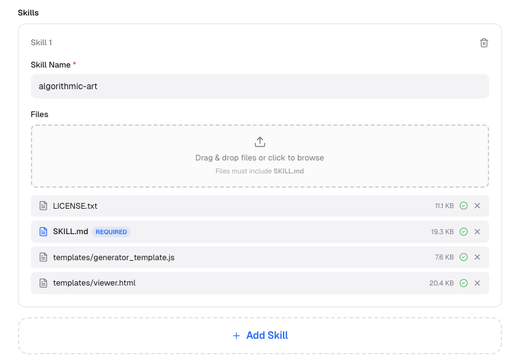
BrainTrust: Skills System & Deep Agent Architecture Upgrade
BrainTrust introduces a powerful new skills framework enabling script execution capabilities, alongside a complete architectural migration from React agents to Deep agents for enhanced reasoning and task handling.
- Skills System with Script Execution – Users can now upload custom skills files to BrainTrust with exclusive support for script execution. This enables agents to extend their capabilities dynamically by running specialized scripts, automating complex workflows, and performing custom operations tailored to specific use cases. Skills are packaged as reusable files that agents can invoke on-demand, transforming BrainTrust into a more flexible and powerful automation platform.
- Deep Agent Architecture Migration – Complete backend overhaul migrating from LangChain React agents to LangChain Deep agents. Deep agents provide more sophisticated reasoning capabilities, improved decision-making through enhanced chain-of-thought processing, and better handling of complex multi-step tasks. This architectural shift results in more reliable agent behavior, clearer reasoning traces, and improved performance on challenging workflows requiring deeper analysis and planning.
- Real Estate Caching Optimizations – Critical performance improvements reduce processing time for heavy workflows from several minutes down to just a few seconds. By implementing smart caching strategies, the platform can now efficiently handle bulk listing operations that previously caused significant delays. This optimization enables real estate teams to process more listings simultaneously, accelerate turnaround times, and scale operations without performance degradation.
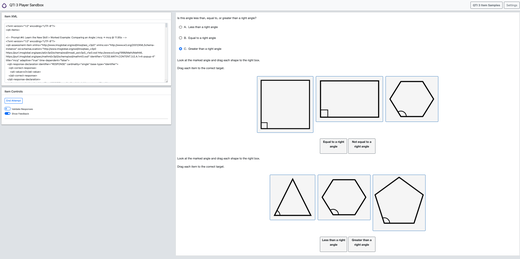
Athena Applets: QTI Export Support & Continued Production
10 new lessons generated with 4 approved this week, achieving a 28.6% approval rate. New QTI converter enables seamless export of lesson content to industry-standard assessment formats.
- QTI converter – Built a QTI (Question and Test Interoperability) converter to export lesson content to the industry-standard assessment format, enabling integration with LMS platforms and assessment systems.
- Production output – 10 new lessons generated and 4 lessons approved this week.
- Iteration metrics – 14 total iterations in the past 7 days: 10 feedback rounds (71.4%) and 4 approvals (28.6%).
- Review efficiency – Total review time of 98 minutes with an average of 7 minutes per iteration.
- Multi-grade review queue – Current queue holds 78 lessons: Grade 3 (13), Grade 4 (3), Grade 6 (62).
LearnLens Studio: Faster Courses, Smarter Notes & Deeper Learning
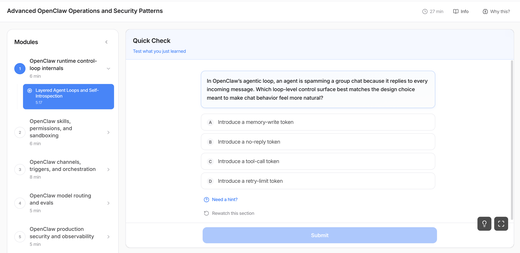
Course generation is now faster, more current, and more useful—jump straight into learning while notes build in the background, with segments enriched by live web data and notes that actually sync to what matters in the video.
- Start learning immediately – Course generation is significantly faster, and notes build in the background while you jump into your first segment—less waiting, more learning.
- Courses powered by live web search – Topics and pre-test questions pull in real-time data so your course reflects what’s happening now, not last year.
- Notes and screenshots that earn their place – Notes sync to your video timeline, and screenshots are AI-selected to capture diagrams, code, and slides—not blank frames or transitions.
- Rewatch exactly what you missed – Tap to jump to the exact video moment a concept was covered, right from a retrieval prompt. No scrubbing required.
- Edit your profile in two taps – User type and grade/industry are editable directly from the profile dropdown as separate badges. Tap to change.
- Fixes – Pretest audio crash resolved. Pretests now load reliably every time; non-English videos now correctly filtered from courses.
EduLLM Math v0.1.0: Support for Math Grade 5
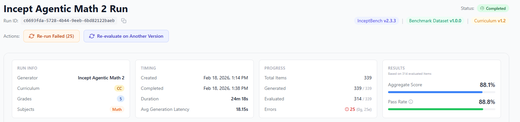
EduLLM Math now supports Math Grade 5.
- Math Grade 5: We have added support for Math Grade 5 standards, enabling generation of questions for this grade level.