
4 February, 2026 - Last week in TI
- Rahul Subramaniam
- Releases
- February 4, 2026
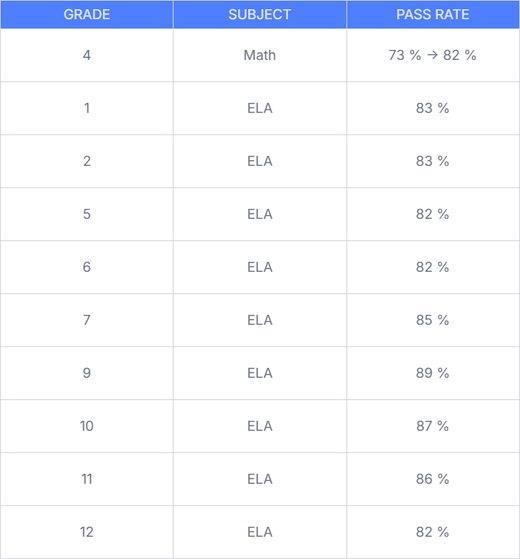
EduLLM v1.2.2: Support for ELA Grade 1-2, 4-7 & 9-12 and improvements in Math Grade 4
EduLLM now supports ELA Grade 1-2, 4-7 & 9-12 and improves the quality of questions for Math Grade 4.
- ELA Grade 1-2, 4-7 & 9-12 support: Added support for ELA Grade 1-2, 4-7 & 9-12 standards, enabling generation of questions for these grade levels. ELA pipeline is now completely orchestrated with claude code and skills.
- Enhancements in Math Grade 4: The quality of questions for Math Grade 4 has been significantly improved, resulting in an increase in the pass rate from 73% to 82%.
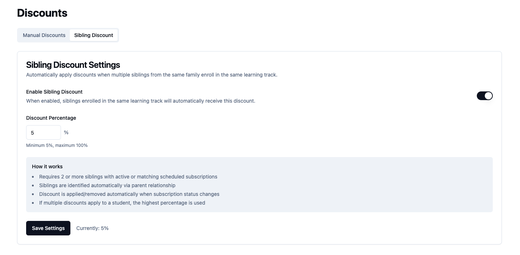
EduPaid v2.17.0: Sibling Discounts & Enhanced Cancellation Options
Automatic sibling discount management makes education more affordable for families with multiple children, while enhanced cancellation options give providers flexible control over subscription management.
- Automatic sibling discount management: New sibling discount feature automatically identifies siblings through Timeback integration and applies configurable discount percentages for sibling enrollments, with discount verification ensuring accuracy only when siblings are verified—making education more affordable for families with multiple children.
- Enhanced subscription cancellation flexibility: Providers gain control with multiple cancellation options including Default (after commitment period), Force Immediate (without waiting), Schedule Cancellation Date (set specific future date), and Cancellation Type Selection to choose the most appropriate method based on the situation.
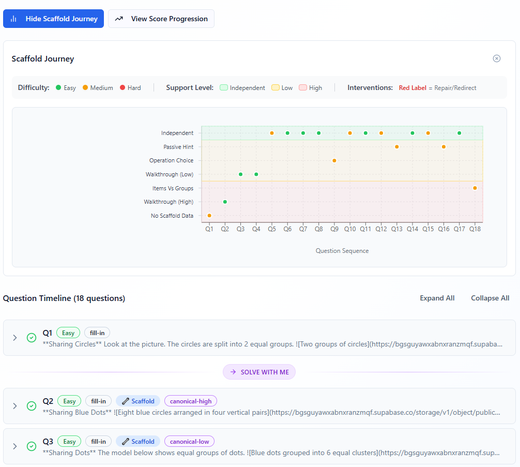
Athena Accelerator: Smarter Interventions & Enhanced Ui
This release brings significant improvements to our intervention system through expanded simulation testing, alongside UI enhancements that make the learning experience more accessible and responsive for all students.
- Intervention System Calibration – The intervention system has been further refined, leading to smarter decisions on when and how to support struggling students. Testing with an expanded set of 10 simulated student personas now shows scores between 70-95, with a median of 80—a substantial improvement over previous performance. Further refinements will take place gradually along with expansion of the evaluation suite.
- Responsive UI Improvements – Multiple components now adapt responsively to different viewport sizes, creating a more consistent experience across monitors, laptops and tablets. Some redesign ensures students can view a question with image without needing to scroll, keeping important content visible immediately. Additional UI updates improve overall student-friendliness and accessibility, with various smaller polish items throughout the interface.
- Expanded Text-to-Speech – Audio support has been extended to all scaffolding and repair set interactions. Previously, text-to-speech was only available on main questions and solution steps—now it covers the full learning journey for students who benefit from auditory support.
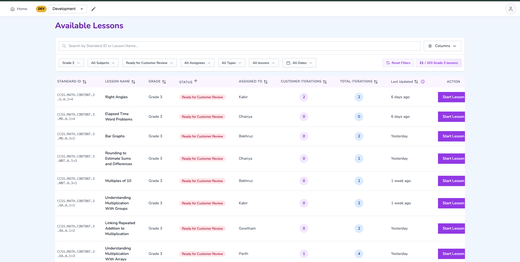
Athena Applets: Interactive Lessons Launch & New QC System
Major milestone achieved with the launch of interactive lessons. 23 new lessons generated with rich interaction types, and a new QC system built specifically for validating interactive content quality.
- Interactive lessons production – 23 new lessons generated with interactions and ready for customer review , 18 lessons ready for internal review, and 12 lessons with internal feedback provided.
- New QC system for interactions – Built a dedicated quality control system to validate and ensure quality of interactive lesson components.
- Audio fixes & redeployment – Fixed click/distortion audio issues across all grade lessons and redeployed them for improved audio quality.
- Production metrics – Lessons approved: 0. Iterations (past 7 days): 0 total. Comments: 1 total.
- Multi-grade review queue – Current queue holds 89 lessons: Grade 3 (20), Grade 4 (3), Grade 6 (62), Grade 7 (4).
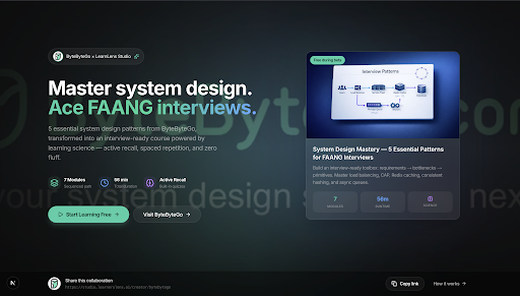
LearnLens Studio: Creator Landing Pages & Flexible Learning Controls
Creators now have dedicated landing pages that showcase their teaching style and content library, while learners gain flexible controls over how they consume course material—making LearnLens Studio more discoverable, personalized, and adaptable to individual learning preferences.
- Dedicated creator landing pages – Shareable pages with creator-filtered content, courses generated in their unique teaching style, and one-click access for audiences to start learning.
- Flexible course introductions – Toggle between Text and Audio modes for ‘Before You Start’ sections with a cleaner layout and consistent creator presence in both formats.
- Optional practice questions – Turn all questions (practice quiz, retrieval prompts, and interleaved quiz) on or off when creating courses—move faster with core content only, or add reinforcement when you need it.
- Enhanced discoverability & trust – AI search optimization for better recommendations, plus 10+ peer-reviewed citations with DOI links and editorial policy pages for transparency.
- Creator analytics & attribution – First-touch tracking from landing through signup and course creation, with lifetime value attribution and video-level analytics including unique videos watched and total watch time.
- Improved audio experience – Fixed audio overlap; switching course segments now immediately stops previous audio for seamless transitions.
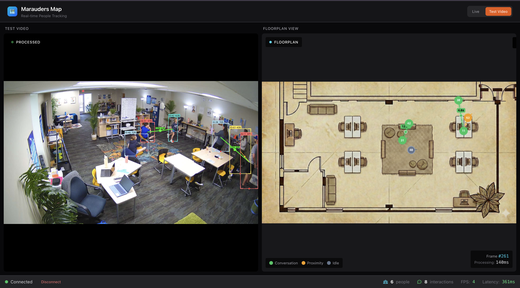
Marauders Map: Realtime Video Processing, Proximity Detection, Interaction Tracking & Floorplan Visualization
Marauders Map now features advanced proximity detection, interaction tracking, and real-time floorplan visualization powered by computer vision and pose estimation.
- Proximity Detection - Automatically detects when two people are within 1.8 meters of each other using dynamic height-based thresholds and real-world distance conversion.
- Interaction Detection - Identifies conversations (facing each other + close + 2+ seconds) and proximity interactions with duration tracking and multi-signal scoring.
- Real-Time Video Processing - Live video streaming from Rhombus cameras via DASH protocol with low-latency WebSocket delivery and position stabilization.
- Floorplan 2D Projection - Projects camera coordinates to 2D floorplan with person markers, orientation arrows, and animated interaction lines (green for conversations, amber for proximity).
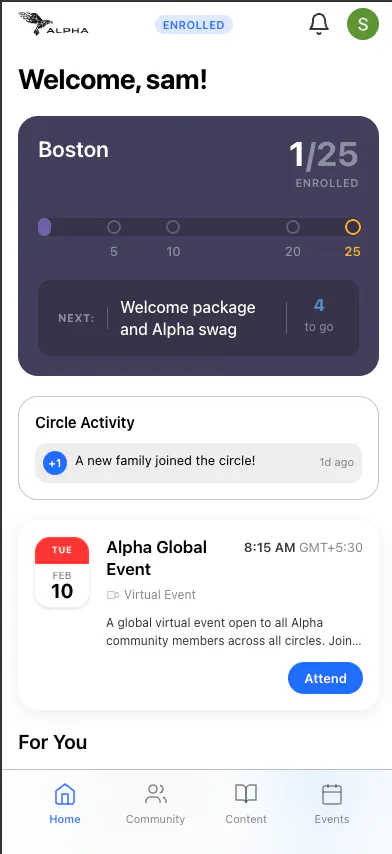
Alpha Communities: Chat Launch, Content Library & Batch Payments
Alpha Communities launches enhanced chat connections for real-time parent messaging, expands the content library with 30+ video/article entries and public sharing, introduces batch payments for multi-child families, and adds member filtering and sorting to the directory.
- Chat connections launch – Enhanced parent-to-parent chat system with rate limiting for message reliability, refined UX for smoother conversations, and email notifications keeping members informed of new messages even when offline.
- Content library expansion – Over 30 Alpha School videos and articles seeded into the library with markdown-based content management, lazy-loaded Mux video player for faster page loads, and public content sharing allowing non-members to preview select content via shareable URLs.
- Batch payments – Multi-child families can now pay for all children in a single checkout session with support for flexible payment amounts, removing the previous $1,000 limit and streamlining the enrollment payment experience.
- My Family (formerly Pods) – Pods system renamed to ‘My Family’ with improved UI, fixed enrollment flow for adding children to family groups, and enhanced activity tracking.
- Members directory enhancements – New filter functionality on the members page lets users narrow down results, with members now sorted for easier discovery of relevant connections.
- Landing page & sign-up updates – Refreshed landing page design, updated sign-up flow now includes Terms & Conditions acceptance, fixed OAuth referral code application, and resolved trailing slash URL issues.
- PostHog user identity – Analytics tracking now includes user identity for better product insights while maintaining privacy.
- Progress bar dark theme – Progress indicators now properly styled for dark mode throughout the application.
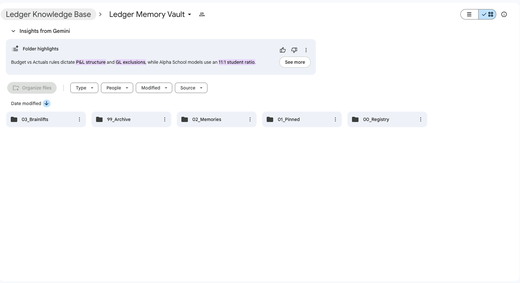
BrainTrust: NetSuite Integration, Advanced Memory Layer & Real Estate Analysis Plugin
BrainTrust’s Finance Agent now connects to NetSuite with custom OAuth2 support, maintains its own intelligent memory system for better context awareness, and introduces a no-code Claude plugin for real estate analysis powered by dynamic skills and MCP servers.
- NetSuite MCP Integration – Finance Agent now connects directly to NetSuite through a new Model Context Protocol (MCP) server. This required implementing support for custom OAuth2 flows in MCP Hive, enabling secure authentication with enterprise systems that use non-standard OAuth implementations.
- Agent-Managed Memory System – Introduced an experimental self-managed memory layer where the Finance Agent creates and maintains its own registry of important information. This replaces the previous mem0 implementation with a more flexible system that allows the agent to decide what to remember and recall, improving context awareness across conversations.
- Real Estate Analysis Plugin – Built a new Claude plugin for real estate market analysis using a skill-based architecture. All scoring dimensions are implemented as individual skills, with connected MCP servers (like the schools data server) providing necessary data. This design lets Claude iterate on the evaluation criteria without code changes, making it easy for non-technical users to refine the analysis pipeline.
- Enhanced PDF Export – Artifact-to-PDF exports now support all markdown features including text formatting, code blocks, and tables, ensuring reports and documents maintain full fidelity when downloaded.